On opening the b0b's web site http://www.b0b.com/sgwest/pp7804p5.htm I get only the background instead of the content. b0b tells me the site works ok when he tried it. Is anyone else having trouble.
I can get the main page but the content pages display only the links back to the index and other pages. Just wallpaper and links .... No content.
unable to access contents of web site
Moderator: Wiz Feinberg
-
Pat Kelly
- Posts: 469
- Joined: 29 Feb 2004 1:01 am
- Location: Wentworthville, New South Wales, Australia
-
Les Pierce

- Posts: 434
- Joined: 4 May 2000 12:01 am
- Location: Shreveport, LA
-
Gene Jones
- Posts: 6870
- Joined: 27 Nov 2000 1:01 am
- Location: Oklahoma City, OK USA, (deceased)
-
Don Poland

- Posts: 1197
- Joined: 31 Dec 2004 1:01 am
- Location: Hanover, PA.
Page opened fine for me 
------------------
1974 MSA D10 Classic 8+5, Goodrich Matchbox 7A, Digitech Genesis 3, Peavey Nashville 112
If you ain't steelin' it, you ain't feelin' it !!
www.steelin4fun.com
donpoland@steelin4fundotcom
------------------
1974 MSA D10 Classic 8+5, Goodrich Matchbox 7A, Digitech Genesis 3, Peavey Nashville 112
If you ain't steelin' it, you ain't feelin' it !!
www.steelin4fun.com
donpoland@steelin4fundotcom
-
b0b

- Posts: 29079
- Joined: 4 Aug 1998 11:00 pm
- Location: Cloverdale, CA, USA
-
Jack Stoner

- Posts: 22147
- Joined: 3 Dec 1999 1:01 am
- Location: Kansas City, MO
-
Richard Bass

- Posts: 864
- Joined: 5 Mar 1999 1:01 am
- Location: Sabang Beach, Philippines
-
Pat Kelly
- Posts: 469
- Joined: 29 Feb 2004 1:01 am
- Location: Wentworthville, New South Wales, Australia
-
Jon Moen
- Posts: 367
- Joined: 13 Mar 2005 1:01 am
- Location: Canada
-
Wiz Feinberg

- Posts: 6113
- Joined: 8 Jan 1999 1:01 am
- Location: Mid-Michigan, USA
I just tried viewing that page in both IE 6 and FF 1.07. I see the image in Firefox, but not in IE 6.0.
The properties of the (missing) image are http://www.b0b.com/sgwest/pp7804p5.gif
I am able to view that image separately in Firefox, but get a placeholder only in IE. However, when I "View" the image on it's own, in Firefox and read it's Properties, I get this information: <BLOCKQUOTE><font size="1" face="Verdana, Arial, Helvetica">quote:</font><HR><SMALL>
The image “http://www.b0b.com/sgwest/pp7804p5.gif” cannot be displayed, because it contains errors.</SMALL><HR></BLOCKQUOTE>
Very strange!
------------------
Bob "Wiz" Feinberg
Moderator of the SGF Computers Forum
<small>Visit my Wiztunes Steel Guitar website at: http://www.wiztunes.com/
or my computer troubleshooting website: Wizcrafts Computer Services,
or my Webmaster Services webpage</small>
The properties of the (missing) image are http://www.b0b.com/sgwest/pp7804p5.gif
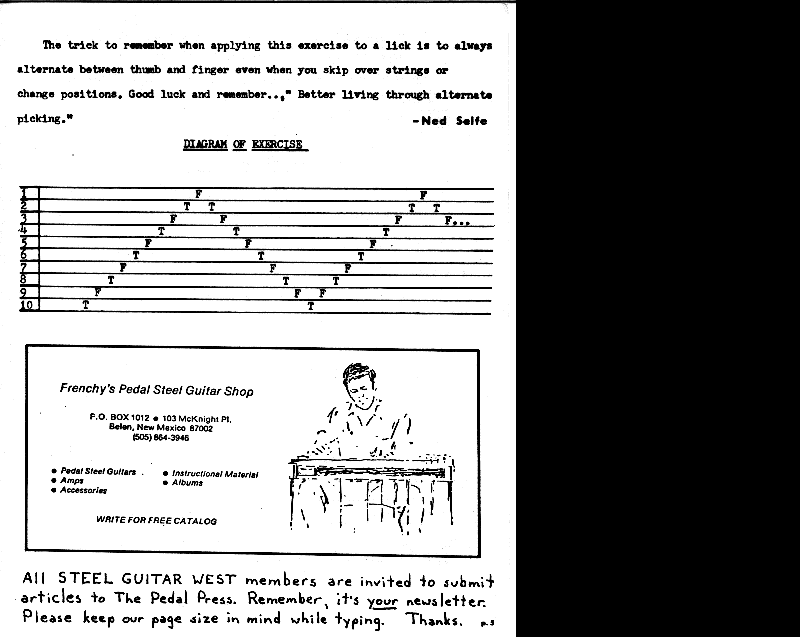
I am able to view that image separately in Firefox, but get a placeholder only in IE. However, when I "View" the image on it's own, in Firefox and read it's Properties, I get this information: <BLOCKQUOTE><font size="1" face="Verdana, Arial, Helvetica">quote:</font><HR><SMALL>
The image “http://www.b0b.com/sgwest/pp7804p5.gif” cannot be displayed, because it contains errors.</SMALL><HR></BLOCKQUOTE>
Very strange!
------------------
Bob "Wiz" Feinberg
Moderator of the SGF Computers Forum
<small>Visit my Wiztunes Steel Guitar website at: http://www.wiztunes.com/
or my computer troubleshooting website: Wizcrafts Computer Services,
or my Webmaster Services webpage</small>
-
Jon Moen
- Posts: 367
- Joined: 13 Mar 2005 1:01 am
- Location: Canada
Doing a little bit of research, the only unusual thing I could find was when I right click the image, in Properties the Type shows "Not Available". At this website: http://support.microsoft.com/?kbid=283807 under resolution I see the following:
1. Right-click the red X or placeholder for the image, and then click Properties. Verify that the image type is supported by Internet Explorer by examining the Type or Address (URL) values in the Properties dialog box. For example, a Graphics Interchange Format (GIF) file will list GIF Image for Type and the Address (URL) ends with .gif. Internet Explorer displays images with an .art, .wmf, .emf, .png, .mov, .xbm, .avi, .mpg, .gif, .jpg, .mpeg, and .bmp extensions.
If I go to other websites and right click a GIF it shows "GIF Image" as Type and the image is visible.
I can open the url for editing in FrontPage and in the Normal pane the image shows but in the preview pane it doesn't.
Jon
1. Right-click the red X or placeholder for the image, and then click Properties. Verify that the image type is supported by Internet Explorer by examining the Type or Address (URL) values in the Properties dialog box. For example, a Graphics Interchange Format (GIF) file will list GIF Image for Type and the Address (URL) ends with .gif. Internet Explorer displays images with an .art, .wmf, .emf, .png, .mov, .xbm, .avi, .mpg, .gif, .jpg, .mpeg, and .bmp extensions.
If I go to other websites and right click a GIF it shows "GIF Image" as Type and the image is visible.
I can open the url for editing in FrontPage and in the Normal pane the image shows but in the preview pane it doesn't.
Jon
-
Pat Kelly
- Posts: 469
- Joined: 29 Feb 2004 1:01 am
- Location: Wentworthville, New South Wales, Australia