I have windows 10. I have flash player. I listened to some you tube music last week and it was fine. Now tonight I do not have you tube sound. Would anyone know what I should do to get the sound back? I really appreciate any suggestions anyone has. I don't know much about doing this sort of thing. I usually mess it up when something says it's easy just push the button.
Again thanks for any suggestions you may have.
Bill Erb
I lost my sound on you tube
Moderator: Wiz Feinberg
-
Dave Potter
- Posts: 1565
- Joined: 15 Apr 2003 12:01 am
- Location: Texas
First advice would be to dump Flash Player - you don't need it for YouTube.
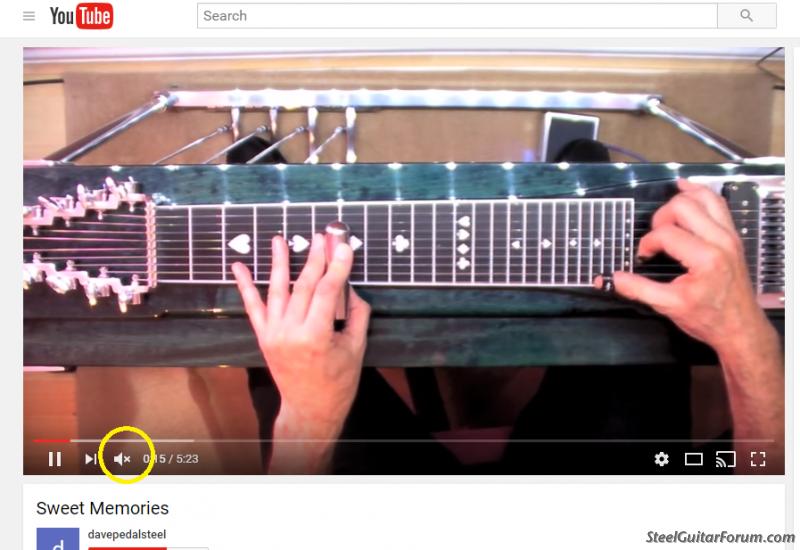
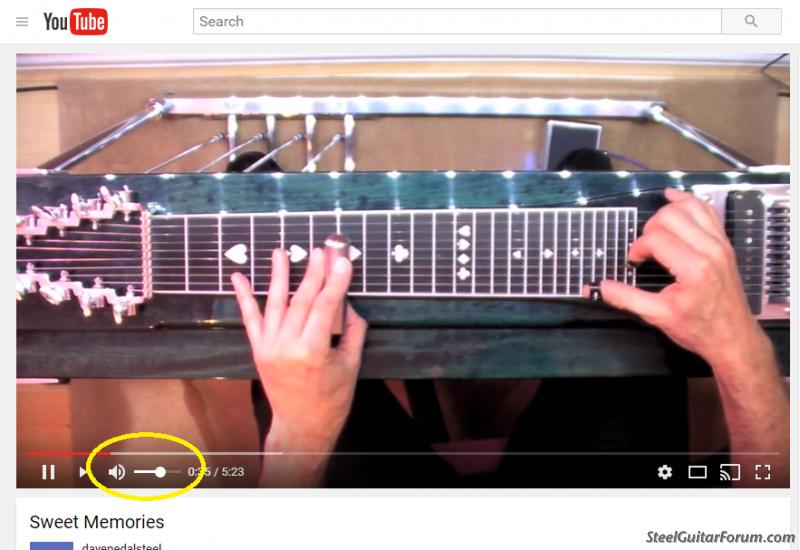
Then, I would start by first checking the YouTube volume slider at the bottom of the screen to make sure it's up and audio is not muted there - two separate settings.
If that doesn't fix it, and since things worked last week, and assuming nothing's been unplugged or otherwise changed since then, I'd look at sound settings on your PC. Left click on the bottom far left icon on the taskbar, the start menu icon. That should bring up your start menu, with some more icons in a column on the left side. Click the Settings icon - it looks like a gear.
The next screen, "Windows Settings" will have a search box at the top. Enter "sound", no quotes, and from the drop-down that opens, click on "Sound". This will open a box showing at least the active sound devices on your system, or maybe inactive ones too, depending on how it's set.
There is a virtual smorgasbord of things you can do inside this magical little box, including testing a device to see if it makes any sound, and selecting your default sound device, which is critical in this case. If you "Test" your default device and it produces no sound, you'll then have to figure out why - it could be any number of things, like cables unplugged, power not switched on (for external powered speakers), volume turned down, unsupported sample rate selected (Properties/Supported Formats), etc - various things, depending on what you're using to produce audio. Just make sure that's the device in the list selected as "Default".
There are many other useful settings available in the Sound window. For example, opening "Properties" for any device shown, and still another box will open, offering you options for more settings applicable to that device. The "Levels" tab inside Properties includes a volume slider, which, if moved all the way left, will reduce volume for that device to zero. Hello?
Have fun.
Then, I would start by first checking the YouTube volume slider at the bottom of the screen to make sure it's up and audio is not muted there - two separate settings.
If that doesn't fix it, and since things worked last week, and assuming nothing's been unplugged or otherwise changed since then, I'd look at sound settings on your PC. Left click on the bottom far left icon on the taskbar, the start menu icon. That should bring up your start menu, with some more icons in a column on the left side. Click the Settings icon - it looks like a gear.
The next screen, "Windows Settings" will have a search box at the top. Enter "sound", no quotes, and from the drop-down that opens, click on "Sound". This will open a box showing at least the active sound devices on your system, or maybe inactive ones too, depending on how it's set.
There is a virtual smorgasbord of things you can do inside this magical little box, including testing a device to see if it makes any sound, and selecting your default sound device, which is critical in this case. If you "Test" your default device and it produces no sound, you'll then have to figure out why - it could be any number of things, like cables unplugged, power not switched on (for external powered speakers), volume turned down, unsupported sample rate selected (Properties/Supported Formats), etc - various things, depending on what you're using to produce audio. Just make sure that's the device in the list selected as "Default".
There are many other useful settings available in the Sound window. For example, opening "Properties" for any device shown, and still another box will open, offering you options for more settings applicable to that device. The "Levels" tab inside Properties includes a volume slider, which, if moved all the way left, will reduce volume for that device to zero. Hello?
Have fun.
-
Steve Green

- Posts: 841
- Joined: 11 Oct 2010 11:28 am
- Location: Gulfport, MS, USA
-
Randy Schneider

- Posts: 227
- Joined: 30 Apr 2016 9:52 pm
- Location: SW New Mexico, USA
-
Bill Erb
- Posts: 229
- Joined: 18 Nov 1998 1:01 am
Thanks everyone for your suggestions. Dave I followed your instructions. I went through settings to sound. There is a place that will test the sound. I hit repair and it found that something was turned off. It then said fixed. I tried another YouTube and I had sound again. Thanks again for your help.
Bill Erb Please close.
Bill Erb
Please close.BILL ERB
-
Dave Potter
- Posts: 1565
- Joined: 15 Apr 2003 12:01 am
- Location: Texas

-
Godfrey Arthur

- Posts: 2986
- Joined: 12 Dec 2012 5:46 pm
- Location: 3rd Rock
Re: I lost my sound on you tube
Must be Windows 10 trying to rearrange your computer settings.Bill Erb wrote:I have windows 10. I have flash player. I listened to some you tube music last week and it was fine. Now tonight I do not have you tube sound.
http://superuser.com/questions/1022063/ ... p-changing
ShoBud The Pro 1
YES it's my REAL NAME!
Ezekiel 33:7
YES it's my REAL NAME!
Ezekiel 33:7