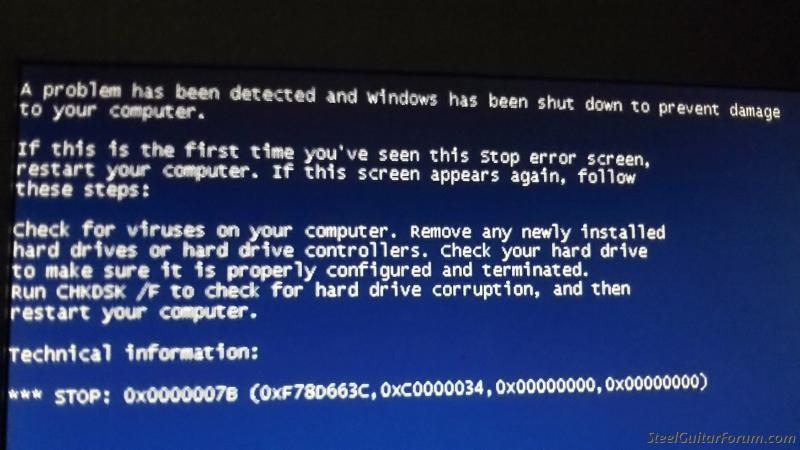
I am trying to load xp onto a separate partition. I get this blue screen with error messages. This is on a newly formatted partition. Windows 7 runs fine on another partition. I have tried changing cluster sizes around and that makes no difference. There is no evidence of viruses on this computer. SuperAntiSpyware finds nothing. This is on an old Dell Optiplex 750 I bought used. It is a 64 bit machine. I have recently loaded xp onto an Optiplex 745 which is about the same thing. This has me stumped.
Any suggestions?
Location: Etowah, TN Western Foothills of the Smokies
Postby Scott Duckworth »
I'm getting the same thing. Here's the situation...
Gateway GM5260 Win XP machine.
Like a dummy, installed a side by side boot of Ubuntu.
Followed all info on the internet as to how to uninstall it, including removing Grub and rewriting the MBR.
Would not boot.
Wiped the HD clean, reformatted NTFS, told it to redo the MBR, still doesn't show up when Win XP CD is inserted, same blue screen as above.
Scott, thanks for helping. I may have gotten it to work. It is loading now. I changed the bios settings so that drives will work with an ata setting. I am guessing xp was made to work with older hard drives. To be honest, I can't remember exactly what I did but I followed the instructions on a youtube video and it seems to be working. I am not even sure if ata is the right term buy I know I changed the hard drive settings in bios. It is in fact loading right now.
James Quillian wrote:Scott, thanks for helping. I may have gotten it to work. It is loading now. I changed the bios settings so that drives will work with an ata setting. I am guessing xp was made to work with older hard drives. To be honest, I can't remember exactly what I did but I followed the instructions on a youtube video and it seems to be working. I am not even sure if ata is the right term buy I know I changed the hard drive settings in bios. It is in fact loading right now.
I still have one PC running XP and it has SATA 1 drives and boots just fine (double boots into Ubuntu). There may be a capacity limit for XP. What is the size of the C drive? Your BIOS may need to be flashed/updated to recognize its full capacity and type.
Location: Etowah, TN Western Foothills of the Smokies
Postby Scott Duckworth »
Wiz, my problem was I installed a non "linux4win.exe" version. I did do a side by side, but once it partitioned the drive, my XP partition was too small too operate. When I tried to uninstall it (delete Ubuntu Partition, fix MBR, expand partition) is when it went south.
Next time I'll be sure it is something like mint4win.exe that installs it to a Windoze folder, as with those, you just do a program uninstall and it uninstalls it.
I start shaking uncontrollably when I see that screen. I'm not using different partitions or have a double boot system. I have no idea why it shows up for me. I rarely happens, so I just live with it.
Can I ask why you have a double boot system to run both Windows and Linux?
Carter D10 8p/7k, Dekley S10 3p/4k C6 setup, Regal RD40 Dobro, Recording King Professional Dobro, NV400, NV112, Ibanez Gio guitar, Epiphone SG Special (open G slide and regular G tuning guitar) .
Scott Duckworth wrote:1) You can run Linux and not worry about virus software that eats up limited access.
Beware! There are now a larger than ever number of cross-platform Trojans, rootkits and spambots that readily install under Linux and Unix. This is something that Linux/Apache server owners and technicians have to fight off on a daily basis.
If you are not running LAMP; just a straight desktop Linux client, and using a limited user account and aren't easily socially engineered, you may survive unscathed. But, browsers and their software plug-ins are all vulnerable, especially if they're not regularly updated (like Firefox for Ubuntu). Also, be careful if you play with php scripts.